Hello Friends, today let us understand AI and your privacy.
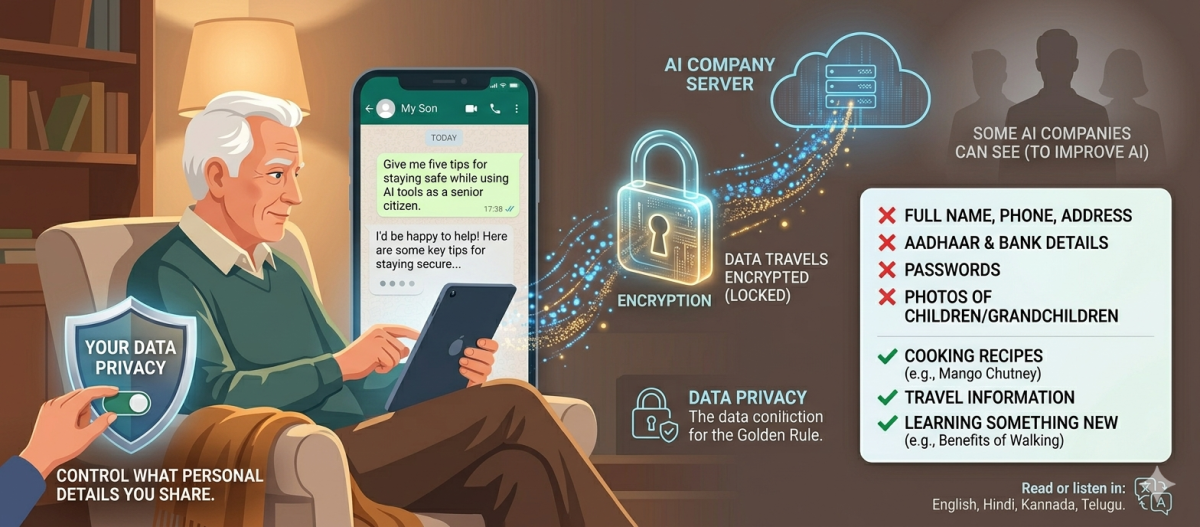
When you type something into an AI assistant — a question about your health, a letter to a family member, or even just a recipe you are curious about — that information travels to a computer server somewhere in the world. Many people wonder: where does it go, and who can see it?
The company that made the AI tool can, in most cases, see what you typed. Some companies use those conversations to improve their AI. Others allow you to turn this off in the settings. A few AI tools keep your conversations private by default.
This does not mean AI is dangerous to use. It simply means you should be thoughtful about what you share. A good rule to follow is this: do not type into an AI anything you would not want a stranger to read. Avoid sharing your full name, phone number, home address, Aadhaar number, bank details, passwords, or photos of your children and grandchildren. For general questions about cooking, travel, health information, or learning something new, AI is perfectly safe and helpful to use.
The same care and caution you bring to any unfamiliar situation is the same care you should bring to sharing personal information online, including with AI.
Two Definitions:
Data Privacy: Your right to control what personal information you share, with whom, and how it is used. Just as you decide who enters your home, you decide what personal details you share with any application, including AI.
Encryption: A way to lock your information with a secret code so only the intended recipient can read it. Many AI tools use encryption to protect what you type while it travels to their servers.
Today’s simple prompt for you to try is this: Open your AI assistant and type: “Give me five tips for staying safe while using AI tools as a senior citizen.” Read through the tips it gives you and share one or two with a friend or family member who is also learning about AI.
You can read or listen to this blog in English, Hindi, Kannada, or Telugu.
To read or listen to this blog in your preferred language, use Google Translate by copying the text and pasting it at translate.google.com
Written by Seetharam Dravida